
Interactive Brokers Setup
Welcome to our complete guide on completing your Interactive Brokers Setup. Whether you are a beginner or a professional algorithmic trader, connecting your terminal correctly is crucial for ensuring a seamless integration with your trading algorithms.
Step-by-Step Interactive Brokers Setup
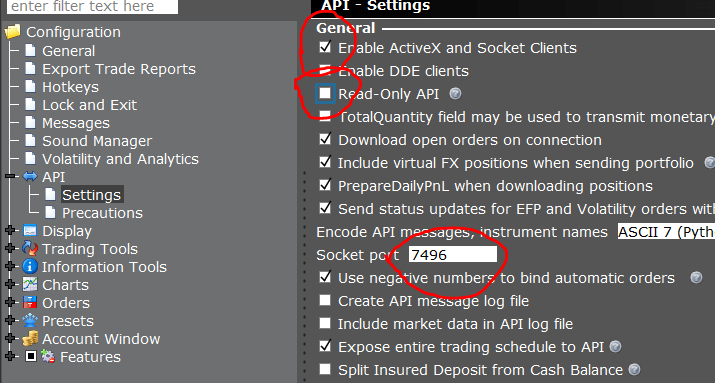
Open Global configuration from File menu in your trading terminal. On the left side, Click on API then Settings, to open Api settings.
Make sure “Enable ActiveX and Socket Clients” option is checked (click yes if prompted). Un-check read-only API.
Set 7496 as Socket Port. Apply settings and click OK.
That’s it! Start APIBridge and click Login to API. It will seamlessly connect with TWS for high-speed algorithmic order placement.
Note that currently IB integration is available only for trading in NSE.
API Features & Specifications
| Cost | Auto Order Cancellation | Live M2M | SL Orders | CO | BO |
| Free | YES | YES | YES | NO | YES |
Why Algorithmic Trading with Interactive Brokers?
Algorithmic trading has revolutionized the way traders interact with financial markets. When you complete your Interactive Brokers Setup, you unlock a powerful suite of tools designed for institutional-grade execution speed. Retail traders often face challenges related to slippage and latency, but a properly configured setup mitigates these risks entirely.
For more information on setting up automated strategies and zero-latency execution, visit the official AlgoJi Homepage. We provide extensive resources on connecting various charting platforms like AmiBroker and MetaTrader seamlessly.
Understanding the TWS API Environment
The Trader Workstation (TWS) API is a robust interface that allows developers and traders to build custom trading applications. By enabling ActiveX and Socket Clients during your setup phase, you allow external applications (like APIBridge) to listen to market data streams and push execution orders directly into the exchange.
It is important to remember that keeping the “Read-Only API” unchecked is mandatory. If this is left checked, your algorithms will only be able to view data but will fail to place any live buy or sell orders. Always verify this specific detail before deploying any live capital.
Security and Best Practices
Security should be your top priority when integrating any third-party API with your brokerage account. Never share your API socket ports or IP configurations publicly. Ensure that your local firewall allows traffic exclusively through the designated socket port (usually 7496 or 7497 for paper trading). You can read more about API security protocols on the official Interactive Brokers India website.
In addition, we highly recommend utilizing the paper trading environment first. A successful Interactive Brokers Setup does not guarantee profitable algorithms. Testing your logic in a simulated environment ensures that any logical errors in your code do not result in real financial losses.
Advanced Order Types and Automation
Once you have connected your API, you can explore advanced order management. Bracket Orders (BO) allow you to define profit targets and stop-loss levels at the moment of entry. This is incredibly beneficial for day traders who cannot monitor the screens constantly. While Cover Orders (CO) are currently restricted in some API configurations, the flexibility of Bracket Orders more than compensates for this limitation. Furthermore, live Mark-to-Market (M2M) calculations are synced instantly between TWS and your bridge application, providing real-time risk management capabilities.
The cost structure is another massive advantage. Accessing the API is completely free, meaning you only pay standard brokerage fees. This democratization of algorithmic tools ensures that retail participants can compete on a level playing field with larger institutions.
Troubleshooting Common Errors
If you face connection issues after following the steps above, ensure that TWS is fully running and logged in before attempting to connect APIBridge. Sometimes, local antivirus software blocks socket connections. Adding an exception for TWS and APIBridge in your firewall settings usually resolves 90% of connectivity errors.
By following these best practices, you can maintain a stable, high-performance automated trading desk from the comfort of your home. With patience, rigorous backtesting, and a solid connection via your API, the possibilities for quantitative trading are truly limitless.